
All Guides
Controls: Keyboard, Mouse, Gamepad in Eternal Palace Sakura
Default PC keyboard and mouse bindings plus known gamepad behavior for Eternal Palace Sakura, with every binding tied to its source.
This page lists default PC controls for Eternal Palace Sakura as reported by walkthroughs and HUD labels on official screenshots. It is not a replacement for the in-game Options menu—always check your build if a patch changes bindings.
For how AP, Arts, Tension, and defensive tools interact in fights, continue to combat basics. New players should read the beginner guide for map and save rules before practicing inputs.
Keyboard and mouse (PC)
GameWith’s launch walkthrough is our primary keyboard table. Two menu keys are confirmed separately on official Steam HUD art.
| Action | Default binding | Source |
|---|---|---|
| Move | W, A, S, D | GameWith walkthrough (media report) |
| Light attack | Mouse left click | GameWith walkthrough (media report) |
| Heavy attack | Mouse right click | GameWith walkthrough (media report) |
| Arts slot 1 | Q | GameWith walkthrough (media report) |
| Arts slot 2 | E | GameWith walkthrough (media report) |
| Arts slot 3 | R | GameWith walkthrough (media report) |
| Arts slot 4 | F | GameWith walkthrough (media report) |
| Dodge | Space | GameWith walkthrough (media report) |
| Shield / barrier | Left Shift (hold) | GameWith walkthrough (media report) |
| Over-Tension | Z (when Tension Gauge is full) | GameWith walkthrough (media report) |
| Status screen | Tab | Official map HUD label (official) |
| Options | Esc | Official map HUD label (official) |
GameWith also notes that shield durability does not recover after it breaks during a run—a combat rule tied to holding block, not a separate key.
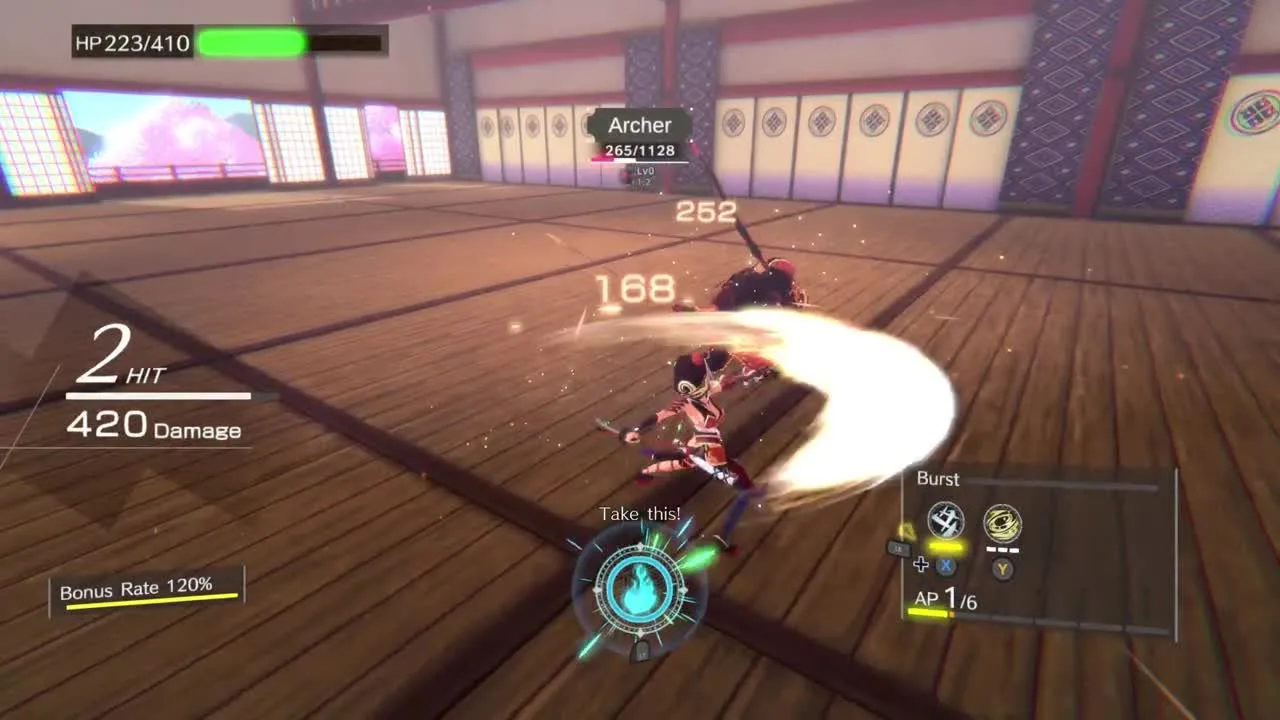
Official Steam screenshot. AP 1/6, Burst, Bonus Rate 120%, and LB / X / Y prompts are one combat frame; AP max and prompts change per build and platform.
The combat HUD in official art shows AP (example 1/6), a Burst gauge for shield burst spend, Bonus Rate from combos, and controller glyphs (LB, X, Y) even when discussing PC—those glyphs reflect Steam’s marketing captures, not proof that every PC player must use a pad.
Arts slots and the loadout
You equip up to four Arts per run. The Q/E/R/F row maps to those slots on keyboard; on pad, the same slots appear as face buttons in HUD examples. Verified Art names and AP costs live on the Arts list—only entries with sources are listed there.
Gamepad support (what we know)
Steam lists Full controller support for the PC release (official store categories). Beyond that label, we do not have an official printed gamepad chart from a manual or Options screen.
| Action | Reported binding | Source |
|---|---|---|
| Lock-on | RB | NoobFeed review (media report) |
| Camera | Right stick | NoobFeed review (media report) |
| Arts | Bumper + trigger or bumper + face button combinations | NoobFeed review (media report) |
| Arts palette (HUD example) | LB shown; X and Y slots visible | Official Steam combat screenshot (official) |
NoobFeed’s descriptions use Xbox-style names (RB, bumpers, triggers). Switch players should expect Nintendo button names in-system even when guides say RB.
GameWith’s PC note matches Steam: mouse, keyboard, and Xbox controller are supported (media report). Whether PlayStation or generic DirectInput layouts show different prompts is not verified.
Related combat inputs (context, not extra keys)
These mechanics use the bindings above but are documented in reviews rather than a second key table:
- Perfect Dodge and Perfect Block refund AP (NoobFeed).
- Shield Burst spends the Burst gauge after blocking (NoobFeed; HUD label Burst (official)).
- Over Arts finishers become available during Over-Tension (GameWith; Game*Spark; NoobFeed)—triggered after the gauge fills, with GameWith citing Z on keyboard.
Movement limits from NoobFeed: no jump and no aerial combos in the reviewed build—plan dodges and lock-on (RB per review) accordingly.
Sources and verification
Sources used
- GameWith walkthrough — keyboard bindings, shield durability note, Xbox controller mention (media report).
- NoobFeed review — lock-on, camera, Arts on pad (media report).
- Steam store page — Full controller support category (official).
- Official Steam screenshots (map HUD Tab/Esc; combat HUD LB/X/Y, AP, Burst) (official).
Still not verified on this page: complete gamepad mapping for all actions; PlayStation button prompts; mouse sensitivity or invert options; remapping or accessibility menus.
FAQ
Does the game support a controller?
What key activates Over-Tension?
Can I rebind keys?
Related Articles
-
guides
Beginner Guide - Your First Run in Eternal Palace Sakura
How one Eternal Palace Sakura run works: branching map rooms, post-fight rewards, save rules, demo on Steam, and what to learn first—without unverified tips.
-
guides
Best Starter Arts & Attributes in Eternal Palace Sakura
Early Arts and Attributes GameWith and English reviews suggest for Eternal Palace Sakura—compiled with sources, not a wiki tier list or hands-on ranking.
-
guides
Eternal Palace Sakura Combat Basics: AP, Arts & Tension
How AP, Arts, Tension, Over Arts, dodge, shield, and Burst work in Eternal Palace Sakura—with sourced basics from GameWith and English reviews.
Was this helpful?
Thanks for the feedback!